Call Communication Tasks
The following sections explain how to manage contact information, log call interactions, and configure communication preferences for obligors in ConcordLink.
Managing contacts and communication details
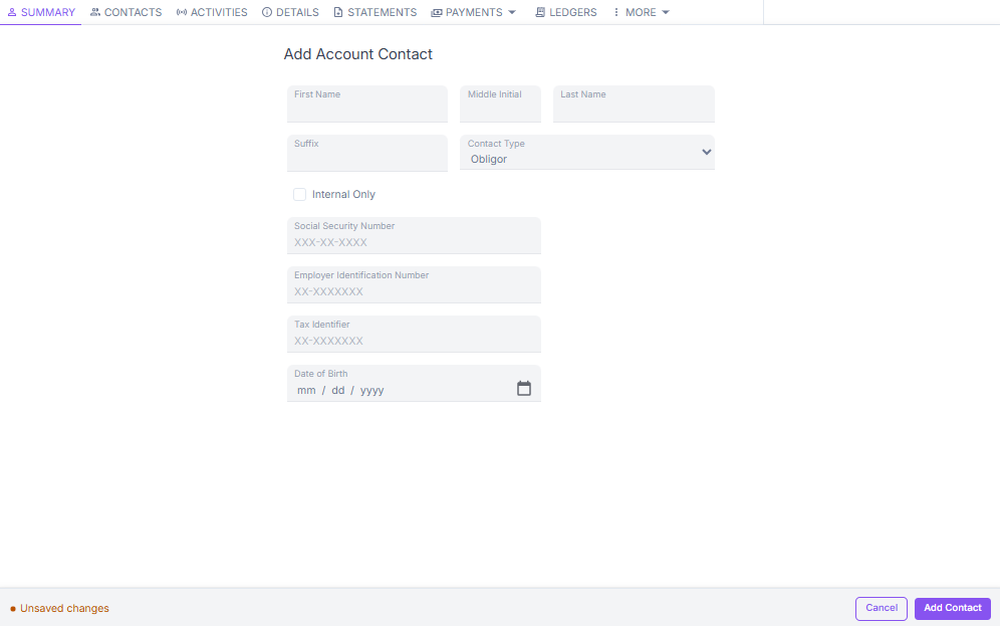
The Additional Account Info section lets you view and manage obligor information, additional contacts such as employers or skip trace leads, and all associated email addresses and phone numbers.
Key contact management options
- Internal Only — check this box to hide a contact entry from the obligor's view. Available to internal Concord employees only. External agents and admins should not use this flag — if a contact entry needs to be hidden, escalate to a Concord agent.
- Preferred call times — set on individual contacts and used by dialers to schedule outreach. Available to external agents (Editor role), external admins, and internal employees.
- Do Not Contact flags — apply these based on a consumer's request or applicable legal restrictions (FDCPA, TCPA). Available to all Editor-role users and above.
Always apply Do Not Contact flags immediately when an obligor requests no further contact or when a legal restriction applies. Document the request in the account notes.
Logging a call
Each interaction with an obligor must be documented. Use the Incoming Call or Outgoing Call option from the sidebar to open the logging form.
- Select Incoming Call or Outgoing Call from the sidebar.
- Select the Call Reason, such as Collections or Payment Inquiry.
- Select the appropriate Resolution Code:
- R1 — Promise to Pay
- R2 — Left Message
- R3 — Special Review (bankruptcy, attorney representation, etc.)
- Set a Follow-Up Date if a callback or next action is required.
- Save the entry.
Follow-up dates set during call logging will appear on the obligation. Call logging features will continue to expand in future releases.
Communication preferences
The Communication Preferences tab lets you view and manage how obligors receive their communications. You can enable or disable email and paper delivery per channel, and view the history of an obligor's opt-in status.
Who can manage communication preferences: External agents (Editor role), external admins, and internal employees. Changes are scoped to the obligor's account within the user's accessible portfolio.
Communication channels
- Statements — monthly billing statements and payoff quotes
- Transaction notices — payment confirmations and autopay notifications
- Marketing — offers such as autopay enrollment or mobile registration
- Collections — past due notices and return letters; always sent by all available methods and cannot be disabled
SMS notifications are not currently available but are planned for a future release. If an obligor asks about text notifications, advise them that this feature is not yet active.
Next: Continue to Handling Calls for the complete QA scoring guide and call scripts.