Audit Trails
Accessing, reviewing, and troubleshooting audit logs for compliance and governance.
The audit trail provides an immutable, complete record of all changes made to accounts in ConcordLink.
Accessing the audit trail
- Navigate to the account in ConcordLink.
- Click the Activities tab.
- Use the Activity Types filter and select Audit.
- Review the log entries — each record shows the field changed, the old value, the new value, the timestamp, and the username of the agent who made the change.
The audit trail is enabled by default for all accounts and is immutable — entries cannot be edited or deleted. Script runs, data imports/exports, and system-generated changes are also captured.
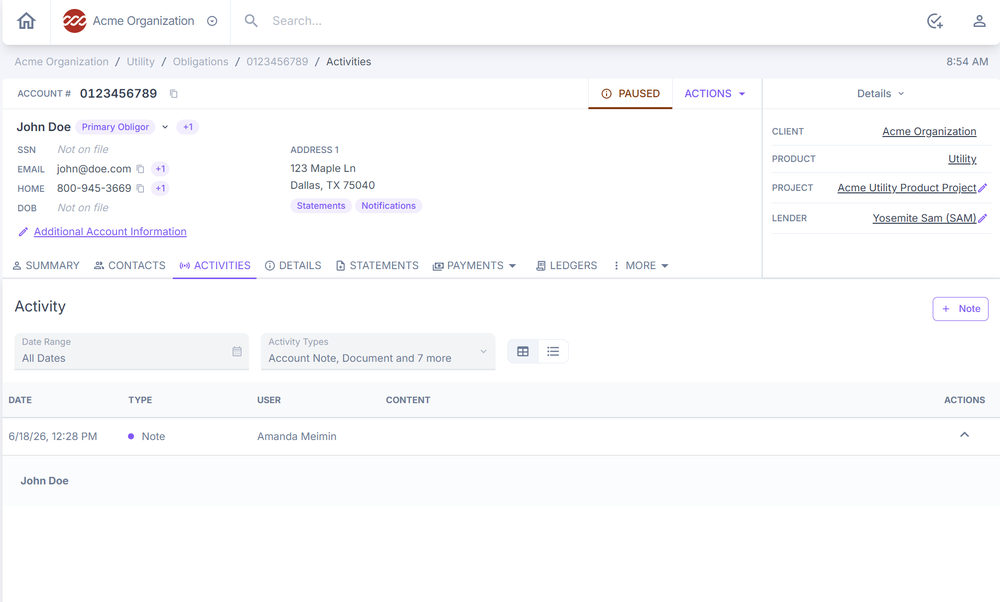
Figure Activities tab filtered by Audit activity type.
Pulling data for regulatory reporting or examinations
| Data needed | Where to find it |
|---|---|
| Account-level records | Activities, Account History, Payments, and Statements tabs on the individual account. |
| Portfolio-level data | Reports section or TrueBI from the Home Dashboard. |
| Credit reporting history | Credit Reports section on the Home Dashboard. Files are generated monthly and available for download by billing period. |
| Custom data extracts | Coordinate with a Concord administrator for formal examination responses. |
Troubleshooting audit trail issues
Audit trail is incomplete or missing activity
- Verify the correct account, date range, and activity type filters are applied.
- Confirm the activity occurred within ConcordLink and was not processed through an external system.
- Check whether the user who performed the action had activity logging enabled.
- If entries appear to be genuinely missing, escalate to Concord support immediately.
Regulatory report is producing incorrect or incomplete data
- Review all report parameters including date ranges, portfolio scope, and field selections.
- Cross-reference the report against the audit trail and account-level data to identify discrepancies.
- Confirm all relevant data has been fully imported and synced before running the report.
- If specific accounts or transactions are missing, investigate whether a boarding or integration issue is the root cause.
- Escalate to Concord ops and Concord support if the issue cannot be resolved.
Unable to evidence a control or process for an audit
- Use the audit trail and transaction logs to pull a chronological record of the relevant activity.
- Pull account-level history, payment records, and any associated notes or correspondence.
- If documentation gaps exist, work with ops to determine whether the activity was performed outside the platform.
- Escalate to your admin to ensure future workflows are configured to capture the required evidence automatically.
Back to: ConcordLink Administrator User Guide