Navigation to Obligations and Obligors
This page explains how to access and navigate the full list of obligations and obligors from the client homepage.
On the right side of the client homepage, the Links section provides direct access to all obligations and all obligors.

What is an obligation or obligor?
An obligation is a financing account record that represents a loan or payment agreement between a lender and a borrower. An obligor is a person who is legally bound to a financing agreement, such as the borrower. See Definitions for further details.
All obligations
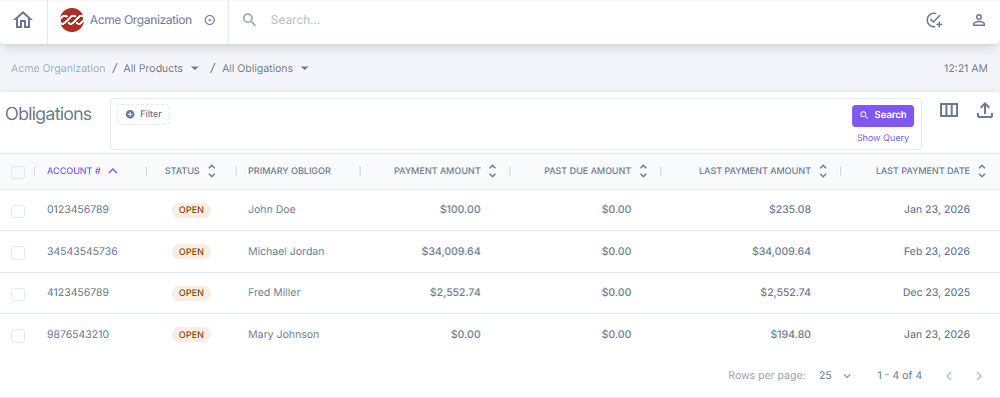
Select All Obligations to open a table view of all obligations. The table includes account number, status, primary obligor, payment amount, past due amount, last payment amount, and last payment date. You can filter results, search for an obligation, sort columns, export the list, and customize table columns. Select a specific obligation to open its account record.
All obligors
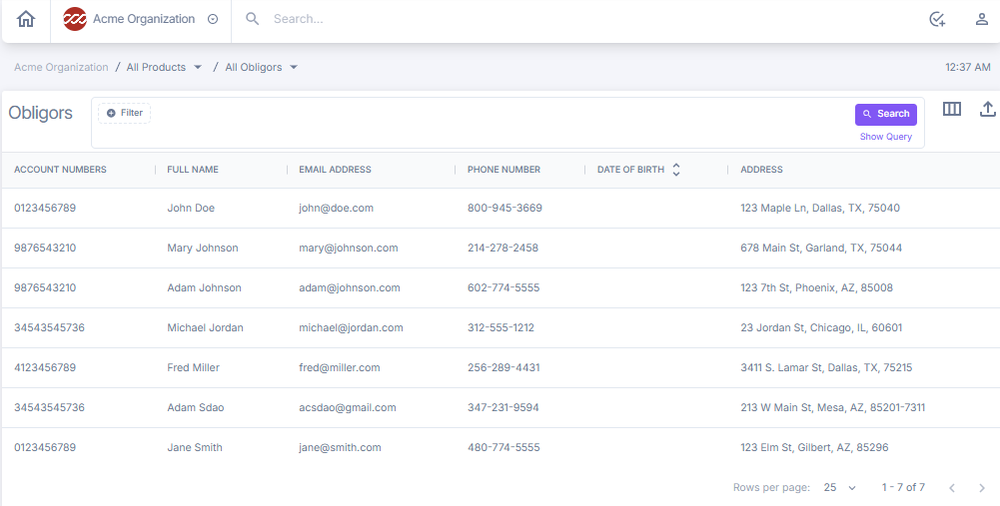
Select All Obligors to open a table view of all obligors. The table includes account numbers, full name, email address, phone number, date of birth, and address. You can filter results, search for an obligor, sort columns, export the list, and customize table columns. Select a specific obligor to open their account record.
Exporting account data
From the Obligations or Obligors list view, use the export icon to download the current data set. Apply filters and search criteria before exporting to narrow the data to the relevant accounts.
Next: Continue to Obligations for a detailed walkthrough of the obligation account page.