Importing APIs
API implementation, SFTP data transfers, and file import processes.
Most of ConcordLink's implementation happens before administrators gain access to the platform. Here is a quick overview of the API implementation and file transfer process.
Integrations and APIs
ConcordLink connects to external systems through API integrations and flat file/SFTP data transfers.
| Connection type | Description |
|---|---|
| API connections | Used by Concord clients to connect to ConcordLink, and configured by the Concord technical team. Support real-time data exchange with third-party platforms including payment processors, lockbox providers, and credit reporting agencies. |
| Flat file transfers | Managed through the Data Imports and Data Exports tabs within product configuration. Can be automated via the Jobs tab. |
Setting up a new API connection
- Submit a request to the Concord support team with the details of the integration, including the system being connected, the data being exchanged, and the desired frequency.
- Concord will provide API credentials and endpoint documentation upon configuration.
Uploading or transferring data via flat file or SFTP
- Navigate to the Data Imports tab within the applicable product.
- Select the relevant import type (for example, CreateObligations, CreateTransactions, BankAccounts, or CreditCards). Each has a defined file format and field mapping requirement.
- Upload the file manually using the import action icon, or transfer it automatically through a configured SFTP connection on a scheduled basis.
- Always run imports in the correct sequence to maintain data integrity: Obligations, then Transactions, then Account Notes, then Payment Methods.
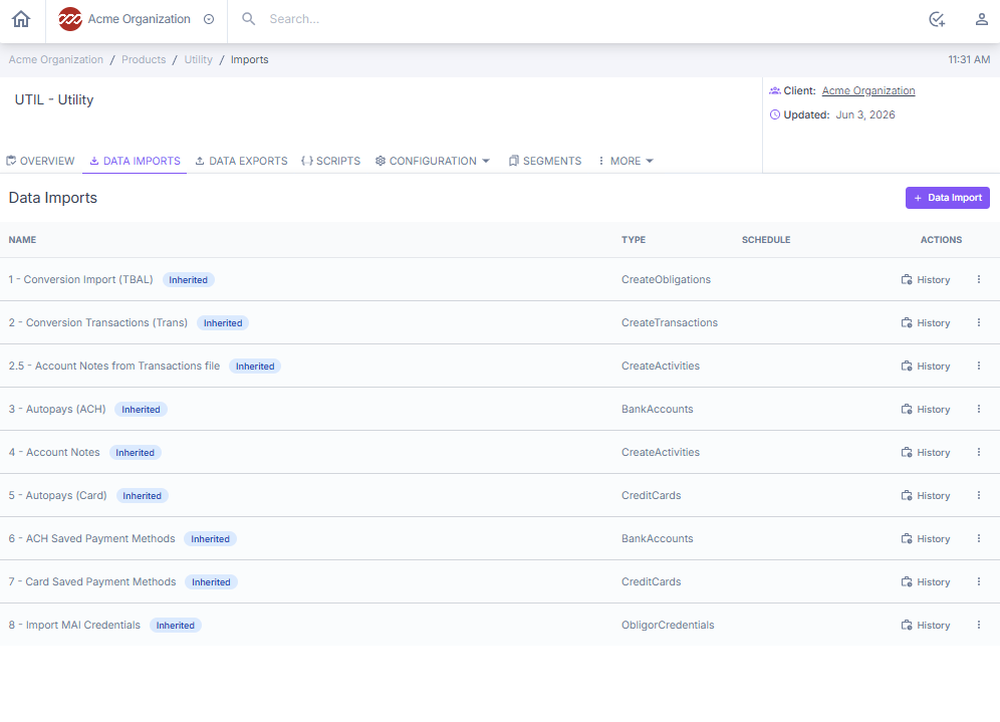
Figure Data Imports tab within a product.
Import templates and SFTP credentials are maintained by the Concord technical team.
Import behavior: recent improvements
Several import behaviors have been hardened so that repeat runs and unusual source files no longer produce silent data problems:
- Multiple autopays per account. A file with several autopays pointing at the same bank account now enrolls all of them. Previously only the first autopay on a given account was loaded.
- Deduplication on re-run. Re-running the same import no longer creates duplicate autopay records. If an autopay already exists, the importer skips it rather than creating a second one.
- Account-number validation. Corrupted or non-numeric account numbers, including Excel's scientific-notation output for long numbers (e.g.,
4.5678E+15), are rejected up front with a clear error. Fix the source file rather than editing on live data. - Nested JSON obligor fields. Nested JSON imports no longer silently drop fields such as obligor details. This was previously causing imports to fail downstream with
at least one obligor is requiredeven though the source file did contain obligor data. - Shared-obligor timeout handling. On shared-obligor products, a timed-out obligation creation used to leave an obligor with no name, SSN, or contacts. Obligor creation now either completes cleanly or rolls back, so there are no more empty-shell obligors.
For encrypted uploads, PGP handling, and newly mappable import fields, see Data Imports/Exports.
Integration troubleshooting
A data sync or integration failure has been identified.
- Check the Jobs tab on the Home Dashboard to confirm whether the scheduled job ran and review its current status.
- Review the Activities log on affected accounts for related error entries.
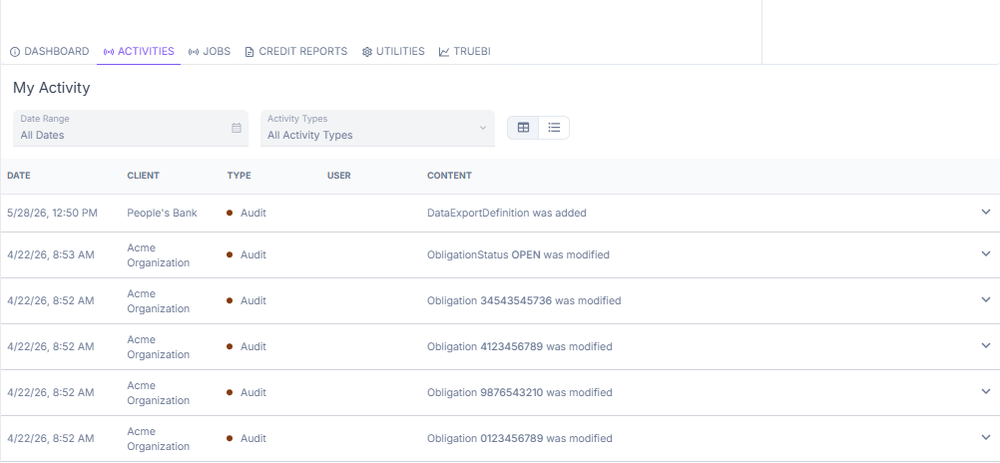
Figure Activities log entries on an account.
- Check the integration log for error messages or failed transfer timestamps.
- Verify API credentials, endpoints, and permissions are current and correctly configured.
- Document the issue thoroughly. Include the integration or job name, time of failure, accounts affected, and any error messages observed.
- Engage the Concord technical team.
- Do not attempt to manually correct data on live accounts until the root cause has been identified and confirmed.
Next: Continue to User Access for guidance on adding users, assigning roles, and managing permissions.