Client Homepage — Reports and Audit History
Understand reporting types
"Reporting" covers several different things in ConcordLink. Before you look for data, confirm which type you need — each one lives in a different location.
| Type | What it is | Where to find it |
|---|---|---|
| Dashboards | Interactive, executive-level views of portfolio performance and collections metrics. Built in TrueBI by the BI team. Currently in development. | TrueBI (will be embedded in ConcordLink when available) |
| Treasury workflows | Operational tools for cash reconciliation and fund transfers — not standalone reports. Includes Summary Treasury (batch files), Payment Detail, and Balancing Workflows (coming soon). | Treasury tab in ConcordLink |
| Standard reports | Pre-built reports delivered uniformly to clients. Powered by TrueBI and accessed from the Reports tab. Every client gets the same template by default. | Reports tab in ConcordLink |
| Data exports | Automated, scheduled data deliveries sent via email or SFTP. ConcordLink reads from its database, processes values using scripts, and pushes data to recipients. Requires TechOps setup. | Submit a request to TechOps |
The Reports tab on the Client Homepage is for standard reports only. If you need batch files or reconciliation data, go to the Treasury tab. For full definitions and a quick-reference guide, see Reporting.
Reports
The Reports section gives you access to standard financial and operational reports. You can view reports immediately and export data in multiple formats.
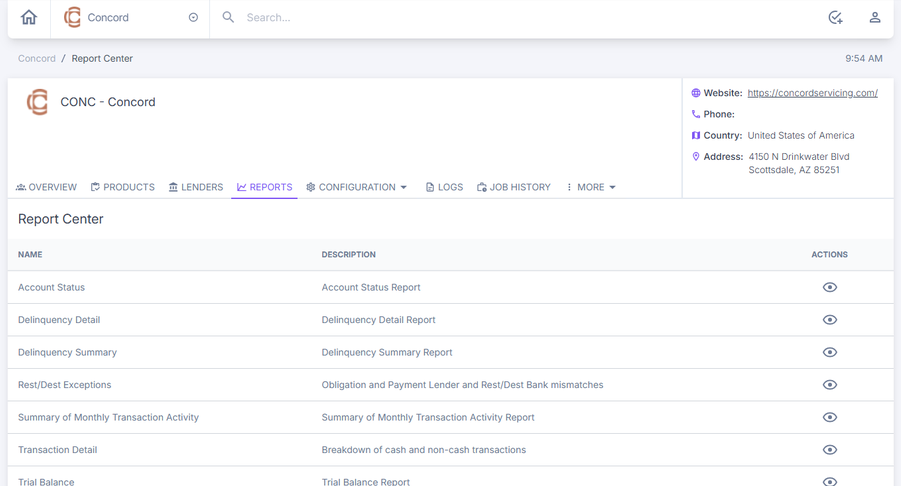
Available standard reports
ConcordLink provides seven standard reports that cover account management, delinquency tracking, transactions, and financial reconciliation.
Account Status report
Gives you an overview of all customer accounts and their current status, including account number, customer name, current balance, account status, account type or product, last activity date, interest rate (if applicable), and payment status.
Delinquency Detail report
Shows a detailed breakdown of all delinquent accounts with specific past-due payment information, including account number, customer name, days past due, original payment due date, amount past due, total account balance, current interest rate, payment history, last payment date and amount, contact information, and collection notes or status.
Use the Parameters panel to configure the report before you run it. Set the client, lender, as-of date, age-by method, and aging bucket thresholds, then select View Report to generate results or Export to download the data.
Delinquency Summary report
Shows a high-level summary of delinquency trends and statistics, including total delinquent accounts, total delinquent dollar amount, delinquency breakdown by age category, percentage of portfolio delinquent, monthly or annual trend comparison, delinquency rate by product type, geographic breakdown, and projected delinquency if trends continue.
Rest/Dest Exceptions report
Identifies accounts that don't match expected criteria, including accounts with unexpected resting status, accounts that should have moved to destination status but haven't, exception type and reason, account details and history, days in exception state, and recommended action.
Transaction Detail report
Shows a complete record of individual transactions, including every transaction in the specified date range, transaction ID, account number and customer name, transaction date and time, transaction type, amount, running account balance, reference or check number (if applicable), originating source, processing status codes, and the user who processed the transaction (if applicable).
Trial Balance report
A financial reconciliation report that shows all account balances at a point in time, including all accounts with their current balance, debits and credits, accounts organized by account type or GL code, total debits, total credits, debit or credit difference, as-of date, and summary totals by account category.
Use the Parameters panel to set the client, lender, product, and as-of date before you run or export the report.
Company configuration menu
The Configuration menu is available from the top navigation bar. Select Configuration to open the dropdown, which includes Client Fields, Lender Fields, and Statuses.
See Configuration Bar for details on each configuration option, including client fields, lender fields, portal settings, data sources, and statuses.
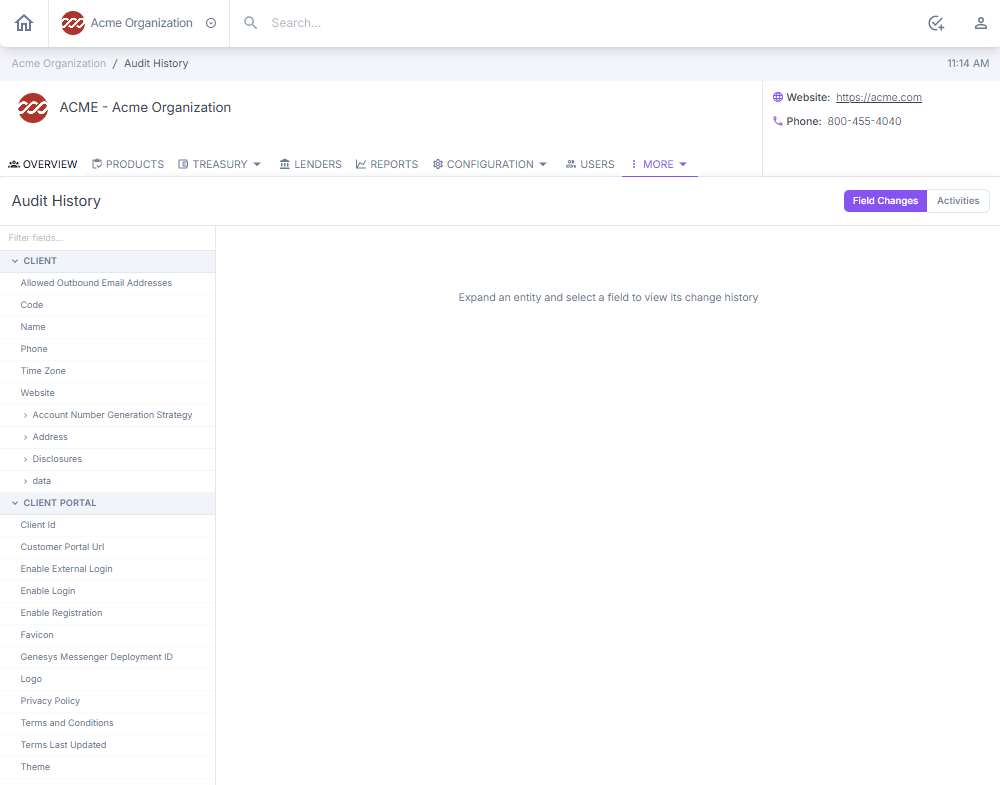
Audit history
Audit History tracks every modification made to a record's fields and activities. It gives you a complete, tamper-proof trail that supports compliance, troubleshooting, and data governance.
Next: Continue to Product Toolbar for product-level tools and configuration.